Logo

SPMe-Fitting (Advanced Parameter Identification)

English 日本語

Physics-Based Battery Parameter Identification

Optimize electrochemical parameters across multiple discharge rates and temperatures simultaneously. Achieve high-fidelity model calibration using our balanced multi-dataset optimization engine.

Launch Fitting Tool

Sequential Parameter Identification Steps

To solve the high-dimensional inverse problem, we decouple the parameters into four distinct physical steps based on their sensitivity to C-rate and temperature.

Step 1: OCV & Stoichiometry (Low Rate)

Aligns the electrode utilization windows and OCP curves. Must be performed at a near-equilibrium state (e.g., 0.05C).

Neg x100
Initial Lithium Stoichiometry in the Anode at 100% SOC.
Pos y100
Initial Lithium Stoichiometry in the Cathode at 100% SOC.
Electrode Area, L_p
Area scales total capacity. L_p (Cathode thickness) tunes the N/P ratio. L_n is locked.
OCP Correction
Fine-tuned vertical voltage shift to align with experimental levels.
Note on Cutoff Voltage: Before fitting starts, the engine automatically extracts the lowest voltage point from your selected experimental dataset and sets it as the simulation's lowerVoltageCutoff. This ensures the simulation terminates at the exact same boundary condition as the experiment.

Note on Capacity Scaling (Physics-First): To match the total experimental capacity without corrupting the macroscopic diffusion length, Step 1 intentionally scales the Electrode Area (by adjusting electrodeWidth internally) rather than arbitrarily changing both thicknesses. The anode thickness (L_n) is completely locked because it typically dominates electrolyte resistance. The cathode thickness (L_p) is allowed to float slightly to fine-tune the N/P ratio. If you want to force the Area to remain fixed, you should manually adjust the Active Material Fraction or Porosity instead.

Step 2: Reaction Kinetics & Solid Diffusion (Medium Rate)

Calibrates the overpotential and voltage slope at moderate currents (e.g., 1C).

j0_ref_n, j0_ref_p
Exchange Current Densities. Represents surface reaction speed.
Ds_n, Ds_p
Solid Phase Diffusivities. Controls Li+ movement inside active particles.

Step 2.5: Electrolyte transport (High Rate)

Captures salt depletion and liquid-phase potential drops. Crucial for the high-rate "knee".

De / ke Multipliers
Scales electrolyte diffusivity and ionic conductivity.
Bruggeman
Tortuosity exponents. Adjusts the effective path length in pores.

Step 3: Thermal sensitivity (Arrhenius)

Determines activation energies ($E_a$). Requires data at varied temperatures (e.g., 0°C, 45°C).

Ea_solid
Links Ds_n and Ds_p temperature sensitivity.
Ea_kinetic
Links reaction rate (j0) temperature sensitivity.
Ea_electrolyte
Links De and ke temperature sensitivity.

Robust Optimization Strategies

Multi-dataset Normalization

Balanced Weighting

We normalize each dataset's contribution by calculating the Average MSE per dataset. This ensures that curves with fewer points (high rate) are not overshadowed by curves with many points (low rate).

Stoichiometry Protection

Capacity Mismatch Penalty

A strong Penalty Term is applied if the simulation's capacity deviates from the experiment, guiding the optimizer toward physically consistent stoichiometry.

Global Search

Multi-Start Nelder-Mead

To avoid local minima, the engine launches from several random initial points simultaneously, followed by a final polishing of the best result.

Workflow: Experimental Data Import

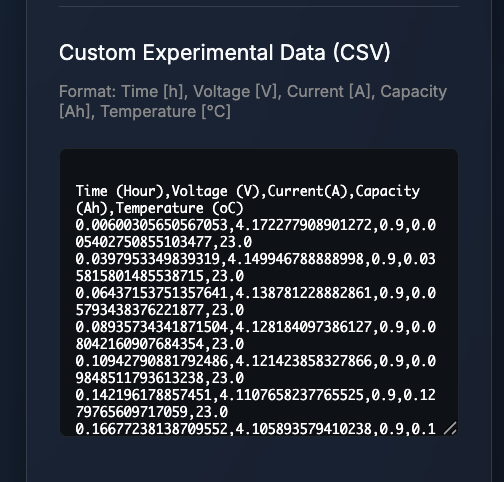
1. Format & Paste

Format your CSV as Time(h), Voltage(V), Current(A), Capacity(Ah), Temp(C) and paste it into the "Exp Data" tab.

2. Automatic Recognition

Click "Update UserData". The tool automatically detects different conditions and generates selection buttons for fitting.
3. Recommended Fitting Sequence

  1. Step 1 (OCV & Capacity): Select a single lowest-rate dataset. Click "Run Step 1". If the RMSE is still high, click it again until it converges.
  2. Step 2 (Kinetics): Select 1 or 2 medium-rate datasets (e.g., 0.5C - 1C). Click "Run Step 2".
  3. Step 2.5 (Electrolyte): Select 1 or 2 high-rate datasets (e.g., 3C - 5C). Click "Run Step 2.5".
  4. Step 3 (Temperature): Select datasets at different temperatures (e.g., 0°C, 45°C) along with the baseline (25°C). Click "Run Step 3" to fit activation energies.
Data Input

Advanced Visualization (Inherited from BattSimWeb-SPMe)

This fitting tool inherits the powerful visualization capabilities of the original Battery Simulator Web (SPMe), allowing you to not only fit data but deeply analyze the internal physical states during the process.

Electrochemical Analysis

Detailed Internal State Charts

  • dQ/dV vs Capacity: Highly sensitive to phase transitions. Crucial for verifying the Step 1 OCV alignment.
  • Electrode Potentials (V vs Li/Li+): Visualizes individual cathode and anode potentials to identify the rate-limiting electrode.
  • Overpotential Breakdown: Separates the voltage losses into cathode and anode contributions based on the SPMe governing equations.
Spatial Profiling

Real-Time Spatial Visualizers

  • Particle Concentration Profile: Shows lithium distribution from core to surface within active particles. Helps verify if solid diffusion (Step 2) is adequate.
  • Electrolyte Dynamics: Visualizes salt concentration across the cell thickness to check for salt depletion at high rates (Step 2.5).
Tip: You can click on the items in the chart legends to toggle the visibility of specific simulation or experimental curves for easier multi-rate comparison.

Critical Warning: Physical & Technical Limits

Isothermal Model Limitations: This model assumes a uniform, constant temperature. Fitting high-rate data where significant physical self-heating occurs will force the optimizer to learn unphysical parameters to compensate for the unmodeled temperature rise. Please use datasets obtained under stable thermal conditions.

Browser Constraints: Due to the heavy nature of running multi-start optimization within Web Workers, **your browser may temporarily freeze or become unresponsive** during intensive fitting cycles. This is an expected limitation of web apps. Please wait for the process to complete or reload the page if it hangs permanently.

References & Acknowledgements

  • Chen2020 (LG M50): Chen et al. "Development of Experimental Techniques for Parameterization of Multi-scale Lithium-ion Battery Models." J. Electrochem. Soc. 167 (2020): 080534.
  • Marquis2019 (SPMe): Marquis et al. "An Upgraded Form of the Single-Particle Model with Electrolyte." J. Electrochem. Soc. 166 (2019): A3693.
  • Kim2011 (NCA): Kim et al. "Multi-domain modeling of lithium-ion batteries encompassing multi-physics." J. Electrochem. Soc. 158 (2011): A955.
  • Ai2020: Ai et al. "Electrochemical Thermal-Mechanical Modelling of Stress Inhomogeneity in Lithium-Ion Pouch Cells." J. Electrochem. Soc. 167 (2020): 013512.
  • Prada2013 (LFP): Prada et al. "A simplified electrochemical and thermal aging model of LiFePO4-graphite Li-ion batteries." J. Electrochem. Soc. (2013).
  • Molicel P45B: Discharge data sourced from 18650 Battery Store and digitized via WebPlotDigitizer (Ankit Rohatgi).
  • PyBaMM: Sulzer et al. "Python Battery Mathematical Modelling (PyBaMM)." J. Open Source Softw. 6 (2021): 2980. pybamm.org

フィッティング・ステップとパラメータ

高次元のパラメータ同定を成功させるため、物理現象の感度に応じて以下の4つのステップに分離して同定を行います。

Step 1: 熱力学と容量 (OCP同定)

電極の利用窓(ストイキオメトリ)とOCP曲線を合わせます。極低レート(0.05C等)で行います。

x100, y100
満充電時(SOC 100%)における負極・正極の初期リチウム含有率。
電極面積 (Area), L_p
面積で総容量を合わせ、正極厚み(L_p)でN/P比(容量比)を調整します。負極厚み(L_n)は固定です。
OCPシフト
実験データとの微細な電圧レベルのズレを補正します。
下限電圧の自動設定について: フィッティング実行時、エンジンは選択された実験データから最低電圧を自動抽出し、シミュレーションの終止条件(lowerVoltageCutoff)として適用します。これにより、シミュレーションは実験データと完全に同じ電圧境界条件で停止します。

容量合わせとN/P比の調整 (物理ファーストアプローチ): Step 1では、電解液の拡散パス(距離)を壊さずに容量を合わせるため、厚みではなく電極面積(Area)を仮想的に拡張・縮小して総容量をマッチさせます。液抵抗の支配要因になりやすい負極厚み(L_n)は完全に固定(Lock)され、正極厚み(L_p)のみがN/P比(極間容量比)の微調整のために動かされます。もし面積も実測値のまま固定したい場合は、フィッティング結果を手動で上書きし、「活物質体積率」や「空隙率」をマニュアル調整してください。

Step 2: 反応動力学と固体内拡散 (Kinetics)

中レート(1C等)での過電圧と電圧降下の傾きを同定します。

j0_ref_n, j0_ref_p
交換電流密度。電極表面での反応速度を左右します。
Ds_n, Ds_p
固体内拡散係数。活物質粒子内のリチウム移動速度を制御します。

Step 2.5: 電解液ダイナミクス (高レート)

液相のイオン移動制限を捉えます。高レート放電末期の電圧降下(Knee)に寄与します。

De / ke 倍率
電解液の拡散係数とイオン導電率をスケーリングします。
Bruggeman
屈曲度指数。細孔内の実効的な移動抵抗を調整します。

Step 3: 温度依存性 (活性化エネルギー)

活性化エネルギー($E_a$)を同定します。異なる温度(例:0°C, 45°C)のデータが必要です。

Ea_solid
粒子内拡散(Ds)の温度感度。
Ea_kinetic
反応速度(j0)の温度感度。
Ea_electrolyte
電解液移動(De/ke)の温度感度。

高度な最適化ロジック

複数データ正規化

マルチデータセット正規化

各データセットの**「平均MSE」**を指標とすることで、点数が多い低レートデータが、重要度の高い高レートデータをかき消してしまうのを防ぎます。

ストイキオメトリ保護

放電容量ペナルティ

容量がズレた場合に**強力なペナルティ**を課すことで、物理的に妥当な電極利用率(x100, y100)へ導きます。

局所解の回避

マルチスタート・最適化

複数の異なる初期点から**同時に最適化を開始(Multi-Start)**し、最も優れた結果をさらに磨き上げることで、グローバルな最適解を確実に捉えます。

操作手順:実験データのインポート

1. データの準備と貼り付け

エクセル等で Time(h), Voltage(V), Current(A), Capacity(Ah), Temp(C) の5列に整理し、"Exp Data" タブに貼り付けます。

2. 自動認識とボタン生成

"Update UserData" をクリックすると、ツールがレートや温度を自動解析し、グラフ上部に**「データ選択ボタン」を自動生成**します。

3. 推奨されるフィッティング手順

  1. Step 1 (OCV / 容量): 最も低レートなデータを1つだけ選択し「Run Step 1」を実行します。結果のRMSEがまだ大きい場合は、波形が重なるまで何度か実行してください。
  2. Step 2 (反応速度): 中レートのデータ(例: 0.5C〜1C)を1〜2個選択して「Run Step 2」を実行します。
  3. Step 2.5 (電解液): 高レートのデータ(例: 3C〜5C)を1〜2個選択して「Run Step 2.5」を実行します。
  4. Step 3 (温度依存性): 基準温度(例: 25°C)に加え、異なる温度のデータ(例: 0°C, 45°C)を複数選択し「Run Step 3」を実行して活性化エネルギーを同定します。
データインポート

高度な可視化と分析 (BattSimWeb-SPMeより継承)

本フィッティングツールは、ベースとなった Battery Simulator Web (SPMe) の強力な可視化機能を完全に継承しています。単なるカーブフィッティングにとどまらず、同定プロセス中の電池内部の物理状態を深く分析することが可能です。

電気化学的分析

詳細な内部状態チャート

  • dQ/dV vs Capacity: 相変化に非常に敏感な電圧微分曲線。Step 1でのOCVアライメントの妥当性確認に不可欠です。
  • 単極電位 (V vs Li/Li+): 正極と負極それぞれの電位推移を可視化し、どちらの極が放電を律速しているかを特定できます。
  • 過電圧の分離: 電圧降下の要因をSPMeの支配方程式に基づいて、正極・負極それぞれの過電圧に分離して表示します。
空間プロファイリング

リアルタイム空間ビジュアライザー

  • 粒子内濃度プロファイル: 活物質粒子内(中心〜表面)のリチウム分布を表示。中レートでの固体内拡散(Step 2)の妥当性確認に役立ちます。
  • 電解液ダイナミクス: セル厚み方向の塩濃度分布を可視化し、高レート(Step 2.5)での塩枯渇の有無を確認できます。
Tip: グラフの凡例(Legend)をクリックすると、特定のシミュレーション曲線や実験データの表示・非表示を切り替えることができ、多数のレート・温度の比較が容易になります。

重要:物理的・技術的な限界について

等温モデルの限界: 本ツールは等温モデルです。自己発熱が顕著な高レートデータを無理に合わせると、物理的に誤ったパラメータを学習してしまいます。熱影響が少ない条件のデータを使用してください。

ブラウザのリソース制限: ウェブワーカー上で重い計算を行う特性上、**フィッティングを繰り返すとブラウザが一時的にフリーズ(無反応)する場合があります**。これはウェブアプリとしての限界ですので、処理が終わるまで待機するか、反応がない場合はリロードをお願いします。

学術参考文献 (Academic References)

  • Chen2020 (LG M50): Chen et al. "Development of Experimental Techniques for Parameterization of Multi-scale Lithium-ion Battery Models." J. Electrochem. Soc. 167 (2020): 080534.
  • Marquis2019 (SPMe): Marquis et al. "An Upgraded Form of the Single-Particle Model with Electrolyte." J. Electrochem. Soc. 166 (2019): A3693.
  • Kim2011 (NCA): Kim et al. "Multi-domain modeling of lithium-ion batteries encompassing multi-physics." J. Electrochem. Soc. 158 (2011): A955.
  • Ai2020: Ai et al. "Electrochemical Thermal-Mechanical Modelling of Stress Inhomogeneity in Lithium-Ion Pouch Cells." J. Electrochem. Soc. 167 (2020): 013512.
  • Prada2013 (LFP): Prada et al. "A simplified electrochemical and thermal aging model of LiFePO4-graphite Li-ion batteries." J. Electrochem. Soc. (2013).
  • Molicel P45B: 18650 Battery Storeの公開データを使用。画像データからの数値化には WebPlotDigitizer (Ankit Rohatgi) を使用しました。
  • PyBaMM: Sulzer et al. "Python Battery Mathematical Modelling (PyBaMM)." J. Open Source Softw. 6 (2021): 2980. pybamm.org

Cite This Simulator (BibTeX)

@misc{kusachi2025fitting,
  author = {Yuki Kusachi},
  title = {SPMe Curve Fitting Tool (Electrochemical Parameter Identification)},
  year = {2025},
  url = {https://www.edandc.com/BattSimWeb-Fitting/},
  note = {YK Energy Device \& Consulting}
}